TOOLCHAIN · DOC

iPower User Manual

First, according to the iSTA README.md open in new window , complete the parsing of verilog,.lib files, link design, parse sdc, spef files, perform timing analysis and obtain the t

Open EDAAI-readyCommunity docsLive TOC
doc — ipa
# open iEDA stack
$ ieda open ipa
[nav ] module linked         ok
[docs] pages indexed         ok
[ai  ] state exportable      ok
→ continue exploring
iMapsynthesisiFPfloorplaniPDNpoweriPLplacementiCTSclockiTOoptimizationiRTroutingiSTAtimingAiEDAdesign dataiPCLlayout modeliMapsynthesisiFPfloorplaniPDNpoweriPLplacementiCTSclockiTOoptimizationiRTroutingiSTAtimingAiEDAdesign dataiPCLlayout model
10Pages here
RTL→GDSOpen flow
AIExportable state
GPL-3.0License

iPower User Manual

Introduction to iPower

Software Architecture Diagram
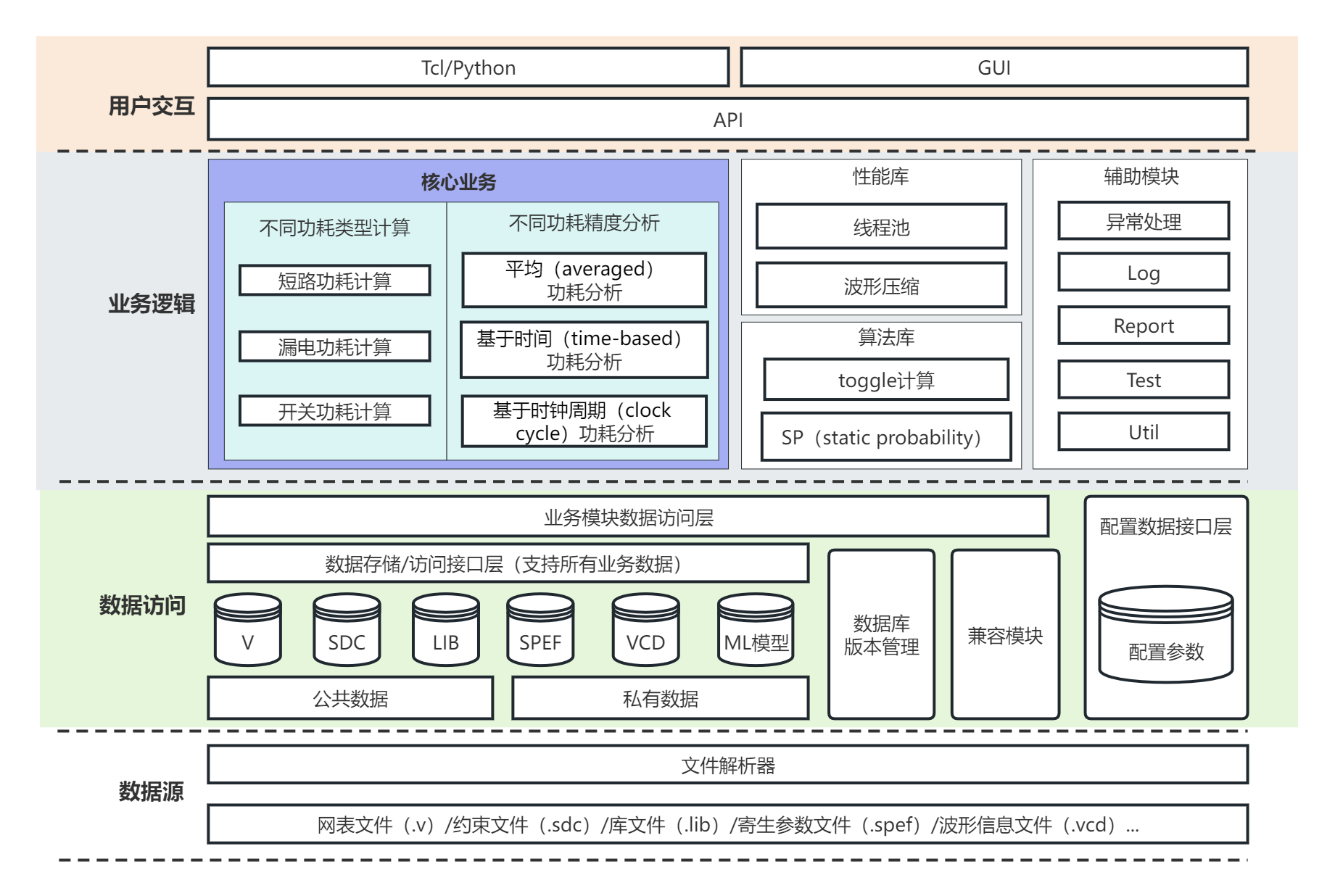
iPower-structure

Supported Features

  • Supports parsing VCD waveform files.
  • Supports outputting power analysis reports, including different types of power consumption (internal power, switching power, and leakage power) and different grouped power consumption (clock network, combinational logic, sequential logic, etc.).

Example of Using the iPower Tool

Writing a tcl File (run_ipw.tcl)

  • Example tcl file:../source/data/example1/run_ipw.tcl

First, according to the iSTA README.md, complete the parsing of verilog,.lib files, link design, parse sdc, spef files, perform timing analysis and obtain the timing report.

Parsing the vcd File

read_vcd test.vcd -top_name top-i

Obtaining the Power Report

report_power

Running iPower Through the tcl File

./iPower run_ipwr.tcl

Build with open intermediate state

Every page connects back to executable tools and AI-ready design data.